
How Tally on Cloud Simplifies Remote Accounting and Work From Home
The rise of remote work has transformed how businesses manage teams, processes, and finances. Companies that once depended on traditional office setups now operate using cloud-based tools, enabling seamless collaboration from any location. Accounting, a function that traditionally relied on physical systems and office networks, has undergone a major shift with the help of cloud technology.
This is where Tally on Cloud becomes a game-changer. For businesses that rely on Tally for daily accounting operations, Tally on cloud offers unmatched flexibility, security, and convenience, especially for remote work and work-from-home setups.
This blog explores how Tally on Cloud simplifies remote accounting and supports modern work-from-home practices, helping businesses stay efficient, compliant, and productive.
The Growing Need for Remote Accounting
Remote work is no longer just an option; it has become a necessity. With teams spread across cities and sometimes across countries, businesses need systems that offer accessibility, security, and real-time collaboration.
However, traditional Tally setups come with limitations:
1. Restricted Access
Tally installed on a local system cannot be accessed remotely unless a complex network configuration is set up. Employees working from home cannot log in without office presence, leading to delays.
2. Collaboration Challenges
Accounting teams, auditors, and business owners often need access to Tally simultaneously. Local installations do not support multi-location access, affecting workflow.
3. Higher Risk of Data Loss
Local systems are vulnerable to:
- Hard disk failures
- Virus attacks
- Physical damage
- Accidental deletion
Remote teams also face security risks when transferring files.
4. Delayed Reporting and Compliance
GST filing, reconciliation, e-invoicing, and audit tasks require real-time access. Remote employees often face difficulties in completing tasks on time.
These challenges have encouraged businesses to adopt Tally on cloud-based solutions for smooth, uninterrupted operations.
Is Tally Available on Cloud?
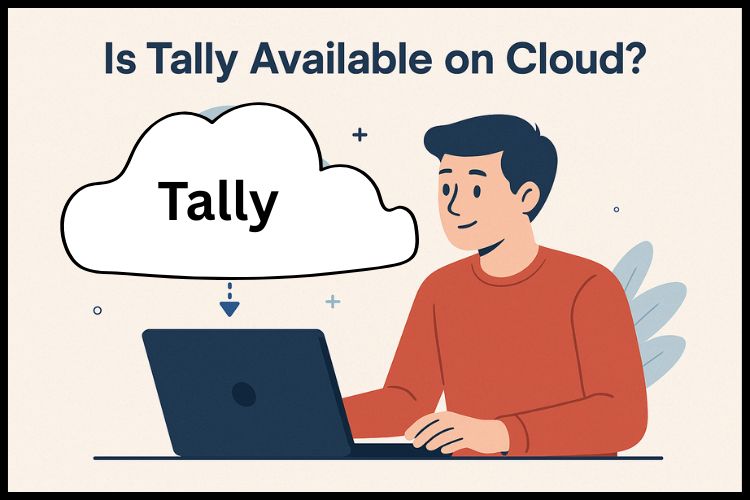
Yes, Tally is fully available on the cloud. Instead of installing the software on your office desktop or local server, Tally can be hosted on a secure cloud server provided by trusted Tally on cloud service providers.
With cloud hosting, you can access Tally anytime, anywhere, using any internet-connected device be it a laptop, desktop, or even a mobile device, through RDP access.
Key benefits of having Tally on Cloud include:
- Remote access from any location
- Centralized database
- Multi-user collaboration
- Enterprise-level data security
- Zero dependency on office infrastructure
This cloud-based approach is ideal for businesses with remote multi-users or multiple branches and for those who want to simplify accounting operations.
What Is Tally on Cloud?
Tally on Cloud is a server solution where your Tally on Cloud Enhances Your Tally ERP 9 Experience or Tally Prime software is installed on a secure remote server. Instead of storing data on a single computer, everything is maintained on the cloud.
You can log in to your cloud-hosted Tally using:
- Windows systems
- Mac computers
- Mobile or tablet via RDP
- Browser-based access (based on setup)
The experience remains the same as using Tally on a local desktop—but with far more flexibility and mobility.
How Tally on Cloud Simplifies Remote Accounting
Let’s explore the key ways Tally on Cloud supports remote teams and enhances work-from-home accounting operations.
1. Access Anytime, Anywhere
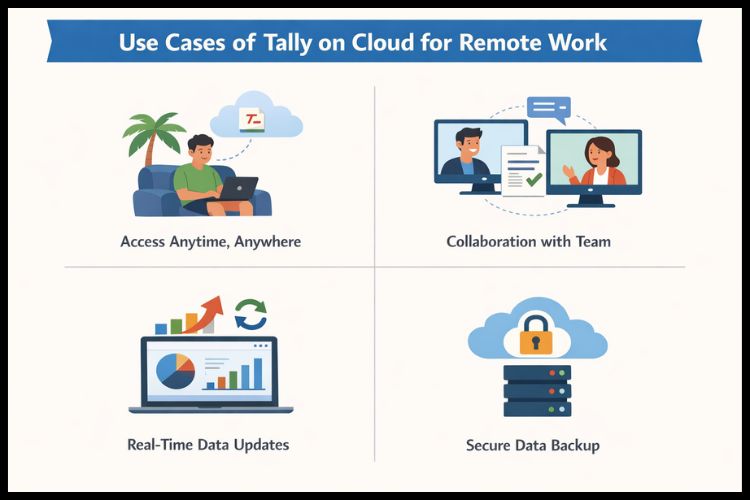
One of the biggest advantages of cloud hosting is location independence. Whether your accounts team is working from home, traveling, or stationed in another city, they can access the latest Tally data instantly.
This ensures:
- Faster accounting operations
- On-time billing
- Smooth financial monitoring
- Instant availability of reports
Remote work becomes effortless when you don’t rely on office hardware.
2. Real-Time Multi-User Collaboration
Cloud-based Tally allows multiple users to log in simultaneously to the same data. This is ideal for:
- Accounting teams
- Managers
- Auditors
- CA firms
- Business owners
All users can work at the same time without version conflicts or duplicate entries. The real-time sync ensures everyone sees the same updated data instantly.
3. Centralized Data for Better Accuracy
Remote accounting requires consistency. Tally on Cloud Demo centralized, real-time data, ensuring:
- No outdated backups
- No mismatched files
- No confusion between versions
- Accurate financial reporting
- Smooth reconciliation
Everyone works on one unified source, helping avoid errors and improving efficiency.
4. High-Level Security for Sensitive Financial Data
Security is a major concern for remote teams using personal devices or unsecured networks. A reliable Tally cloud provider offers:
- End-to-end encryption
- Firewall and malware protection
- Multi-layer authentication
- Role-based access
- Secure data centers
- Regular audits and monitoring
5. No Need for Physical Hardware or Complex Setup
Traditional accounting requires:
- Servers
- LAN cables
- IT maintenance
- Backups
- Hardware upgrades
Tally on Cloud eliminates all these requirements. You only need:
- Internet
- A login ID
- A device to access Tally
This reduces setup time and eliminates technical headaches—ideal for remote teams.
6. Automatic Data Backups and Disaster Recovery
Cloud hosting providers offer automated backups and disaster recovery systems. This protects your data from:
- Hardware failure
- Accidental deletion
- File corruption
- Human error
- Cyberattacks
Your data is backed up daily or as per your plan, ensuring business continuity even during emergencies.
7. Scalable for All Types of Businesses
Cloud servers are flexible and scalable. You can add or remove users instantly based on your business requirements.
Perfect for:
- Growing businesses
- Seasonal staff
- Branch expansions
- CA firms with multiple clients
Scale up when required and scale down when work reduces—pay only for what you use.
8. Cost-Effective and Budget-Friendly
Tally Cloud eliminates the cost of:
- Hardware
- Server rooms
- Network cabling
- IT staff
- Maintenance
- Electricity
Most Tally on Cloud pricing plans starting around ₹400 per user per month, and Tally on cloud multiuser pricing plans, making it cost-efficient for small, medium, and large businesses.
4. Use Cases of Tally on Cloud for Remote Work
Tally Cloud can be used by various industries. Here’s how different businesses benefit:
1. CA & Accounting Firms
- Access multiple clients’ data remotely
- No need to travel to client locations
- Easy audit and compliance management
2. Retail & Multi-Branch Businesses
- Real-time stock visibility
- Centralized billing systems
- Consolidated reporting
3. Service-Based Companies
- Remote invoicing
- Expense monitoring
- Project-based accounting
5. Why Tally on Cloud Is the Best for Work From Home
Here’s why businesses prefer cloud hosting for remote accounting:
- Hassle-free remote login
- Zero downtime
- Secure access from any device
- Improved accuracy
- Faster decision-making
- No dependency on office IT infrastructure
- Ideal for hybrid and remote teams
Tally Cloud ensures business continuity in all circumstances, whether teams work from the office, home, or on the move.
Conclusion
Remote work has become a permanent part of modern business operations. To keep accounting processes smooth, fast, and accurate, Tally on Cloud is the ultimate solution for businesses embracing remote accounting and work-from-home setups. Trusted providers like Tallystack make this transition even smoother by offering affordable plans, strong data protection, and fully managed cloud environments.
Frequently Asked Questions
Q1. What is Tally on Cloud?
Tally on Cloud allows you to run Tally from a secure online server, giving you anytime, anywhere access without depending on office computers.
Q2. How does Tally Cloud help with work-from-home?
It enables remote access, multi-user collaboration, secure data sharing, and real-time updates, making accounting possible from any location.
Q3. Is Tally Cloud safe for storing financial data?
Yes. With encryption, firewalls, backups, and 24×7 monitoring, Tally Cloud provides enterprise-grade security for your financial records.
Q4. Can multiple users access Tally Cloud at the same time?
Yes. Multi-user plans allow accountants, auditors, and business owners to work together in real time from different locations.
Q5. Can I scale users easily in Tally Cloud?
Yes. You can add or reduce users anytime based on your team size or seasonal requirements.
Q6. Is Tally on Cloud suitable for small businesses?
Yes. It is cost-effective, requires no hardware, and improves productivity—making it ideal for startups, SMEs, and enterprises.