
How to Secure Financial Data Using Tally on Cloud Server in 2026
Losing years of accounting data to a crashed hard drive or a ransomware attack isn’t just inconvenient; it can shut a business down overnight. If you’re still running Tally on a single desktop, you’re one power surge away from disaster.
In 2026, more companies will look for safe Tally on cloud hosting for small enterprises. Not only does cloud hosting enable Tally to be accessed from any location, but it also significantly alters the security of your financial information.
In this guide, we’ll walk through exactly how Tally on cloud server hosting keeps your data safe, what security features to look for, and how a provider like TallyStack builds these protections in from day one.
Why Tally Data Security Matters More Than Ever in 2026
Accounting software is a prime target since it contains all the information an attacker might possibly require, such as financial records, vendor information, and bank account information. In recent years, there has been a rise in cyberattacks on small and mid-sized businesses.
Key risks businesses face:
- Ransomware attacks are locking local Tally files
- Unauthorized access from ex-employees or shared devices
- Data loss from hardware failure with no backup
- Non-compliance penalties during audits
- Weak or reused passwords expose the entire company’s data
Moving your data to a secure Tally on cloud environment for GST-compliant businesses addresses most of these risks at the infrastructure level, not just the software level.
What Is Tally on Cloud and How Does It Work??
Your data and application are kept on a safe, remote server rather than a local desktop when you use Tally on Cloud. With the same interface, shortcuts, and no learning curve as using Tally locally, you may use it online.
With TallyStack, this typically includes:
- A dedicated or shared virtual server running licensed Tally
- Encrypted remote desktop or browser access
- Automated backup and monitoring systems
- Admin-controlled user permissions
By logging in simultaneously from many locations, managers, accountants, auditors, and other team members can safely work on the same live data with this configuration.
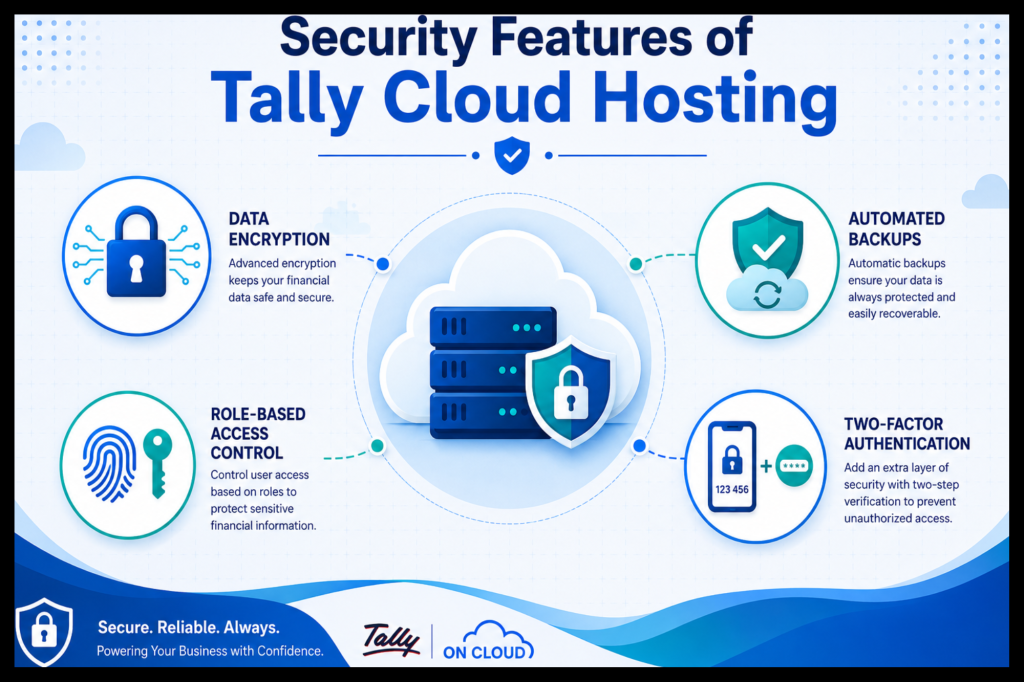
Core Security Features of Tally Cloud Hosting
A truly secure Tally on cloud hosting solution for accountants and CA firms should have the following security layers:
Data Encryption
Data should be encrypted both during transmission over the internet (SSL/TLS) and during storage so that even if someone tries to intercept it, they won’t be able to access it without the correct key.
Automated Backups
Daily automated backups stored in many locations prevent ransomware attacks, accidental data loss, and corruption.
Role-Based Access Control
Not everyone requires complete access.
Permissions ought to be given in a way that:
Only vouchers can be entered by junior employees.
Reports are viewable by managers.
Only admins can modify company data or export files
Two-Factor Verification
Using two-factor authentication (2FA) makes it impossible for someone to access your account, even if they manage to steal your password, in contrast to standard desktop Tally security.
IP Whitelisting and Firewall Protection
A properly set up Tally on a cloud server with firewall protection limits login attempts to approved IP addresses or locations, stopping common attacks before they can even start.
Session and Activity Logging
Thorough audit records show who logged in, when, and what was done.
This is especially important when doing audits or searching for unusual activity.
Data Center Compliance and Redundancy
In order to prevent total data loss from a single failure, look for providers who employ geo-redundant storage, have redundant power supplies, and host their services in data centers certified by ISO 27001 or SOC 2.
Additional Ways to Strengthen Your Tally Cloud Security in 2026
Beyond the essential features, there are a few more steps that can significantly improve security for businesses with sensitive financial data:
- In the case that a device is misplaced or stolen, endpoint device monitoring aids in limiting which devices have access to the server.
- In order to lower the possibility of unwanted access from unattended devices, automatic session timeouts terminate inactive sessions.
- Version history and rollback allow you to restore an earlier version of company data in case of an error or malicious edit.
- Dedicated vs. Shared server options: For superior enterprise-level security, companies with more stringent compliance requirements frequently favor a dedicated Tally on cloud server over a shared environment.
- Frequent penetration testing Find out how frequently your provider tests their systems against actual threats.
Best Practices to Secure Your Tally Data on Cloud
Even the best hosting can’t replace good habits.
Follow these practices:
- Choose a certified provider.
Ensure your Tally on cloud partner follows recognized data security standards.
- Audit access regularly.
Remove inactive users and review permissions quarterly.
- Restrict exports.
Limit who has the ability to download or export sensitive data.
- Plan for disaster recovery.
Confirm your provider can quickly restore data in case of an outage.
- Train your team.
People’s errors remain the leading cause of data breaches.
- Enforce strong password policies.
Combine this with 2FA for the most effective security with the least effort.
- Review your backup restore process.
A backup you never test is not a reliable backup.
Tally on Cloud for Mac Users
Previously, Mac users faced a real challenge: Tally does not run natively on macOS.
Cloud hosting resolves this issue instantly.
With TallyStack’s secure Tally on cloud hosting for Mac and cross-platform teams, Mac users get:
Full Tally functionality through a browser or remote client
No need for dual-boot systems or virtual machines
The same security features as Windows users
This makes managing cross-platform teams much easier and more secure.
How to choose the best Tally on cloud service for data security in 2026?
Look for uptime assurances of at least 99.9%.
24/7 technical support
Scalable plans that can grow with your team
Transparent security documentation, not just vague promises
Clear data ownership and exit terms so you’re never locked in
Your data is handled with the same care as a bank’s vaults by a trustworthy Tally cloud partner.
Conclusion
In 2026, protecting your Tally data is crucial to operating a robust company.
You may get encryption, automated backups, controlled access, audit trails, and peace of mind that typical desktop installations just cannot provide by switching to a secure Tally on cloud server.
Are you prepared to transfer your Tally data to a safe cloud environment?
Get a free security evaluation for your current configuration by speaking with TallyStack right now.
Frequently Asked Questions
Q1.What is Tally on cloud, and how is it different from regular Tally?
Tally on cloud hosts your Tally software and data on a remote, secure server instead of a local computer.
This allows for encrypted remote access, automated backups, and multi-user login from anywhere.
Q2.Is Tally Cloud hosting safe for sensitive financial data?
Yes, when hosted by a certified provider like TallyStack, Tally Cloud uses encryption, role-based access, firewall protection, and regular backups, often making it safer than an unprotected local desktop.
Q3.Can I use Tally for Mac with cloud hosting?
Yes.Since Tally doesn’t support macOS natively, cloud hosting lets Mac users access full Tally functionality through a browser or remote client without workarounds.
Q4.How often is data backed up on Tally cloud servers?
Reputable providers perform automated daily backups, often storing copies in separate secure locations to protect against data loss or corruption.
Q5.Does Tally on cloud support multiple users at once?
Yes, cloud hosting is designed for multi-user access, allowing accountants, auditors, and managers to work on the same live data simultaneously with individual access levels.
Q6.What should I check before choosing a Tally Cloud provider?
Look for uptime guarantees, 24/7 support, encryption standards, backup frequency, data center certifications, and transparent security documentation before signing up.
Q7. Is a dedicated server more secure than a shared Tally cloud server?
Generally, yes, a dedicated server isolates your data from other users entirely, which is why businesses with strict compliance requirements often choose this option over shared hosting.