
How Should the CA Firms Manage TallyPrime User, Role & Permission Security with Tally on Cloud?
For CA firms handling accounting, taxation, audit, and compliance work for multiple clients, controlling who can access TallyPrime data and what they can do with it is critical. As teams become more distributed and accountants increasingly work from different locations, traditional desktop-based setups can make user management, access control, and collaboration more difficult.
This is where Tally on Cloud can provide a more flexible working environment. By hosting TallyPrime in a cloud computing-based setup, CA firms can enable authorized professionals to access accounting data remotely while maintaining structured user roles and permissions.
TallyPrime itself provides security features that allow administrators to create users, define security levels, restrict access to specific facilities, and manage remote access.
For a CA firm, however, simply moving TallyPrime to the cloud is not enough. Security depends on how users are created, how permissions are assigned, how access is reviewed, and how sensitive accounting activities are controlled.
This guide explains how CA firms can implement a practical user-access strategy with TallyPrime on Cloud, while improving security, accountability, and productivity.
Why User and Permission Management Matters for CA Firms
Many CA firms are responsible for handling financial data from several companies at once. The types of data may be
- Transaction details of sales and purchases
- GST data
- Bank and cash data
- Payroll details
- Ledger and outstanding reports
- Financial statements
- Tax documents
- Audit documents
- Customer and vendor information
However, not everyone is allowed to see all this information.
For example, while a junior accountant is restricted to vouchers only, a senior accountant has access to the reports and reconciliations. Giving every employee unrestricted access creates unnecessary risk.
The principle of least privilege
A strong access-control strategy follows the principle of least privilege:
Give each user only the permissions required to perform their assigned responsibilities.
This approach can help reduce accidental changes, unauthorized access, inappropriate data exports, and other operational risks.
TallyPrime supports multiple security levels and user-specific access rights, allowing administrators to configure access according to job responsibilities.
How Does Tally on Cloud Help CA Firms Manage Users?
Tally on Cloud allows TallyPrime to be accessed through a hosted environment instead of restricting accounting work to a single physical office computer or local network.
For CA firms, this can support:
- Remote accounting teams
- Multi-location operations
- Home-based accountants
- Client servicing teams
- Audit teams working away from the office
- Partner account reviews done remotely
- Access control to shared company information
TallyPrime also supports remote access, where administrators can create Tally.NET users, enable remote access, and assign security levels.
The important point is that cloud accessibility and application-level permissions should work together.
A cloud environment determines how users connect to the hosted system, while TallyPrime’s user and security controls help determine what those users can do after accessing the company data.
How to Set Up Secure TallyPrime User Management for a CA Firm
1. Create Individual User Account
Do not use a common username for a whole accounting department.
Make individual accounts for the following users:
- Accountant
- Senior Accountant
- Auditor
- Manager
- Partner
- Data-entry operators
- Administrators
Individual accounts improve accountability because activities can be associated with specific users.
TallyPrime allows administrators to create and manage users and assign appropriate security levels.
Why using the same accounts is dangerous.
Let’s say that five accountants share the same username and password.
If there is any modification of the vouchers, the administrator will be able to know the account that did this but not the person. With individual accounts, firms can establish clearer accountability.
2. Create Roles Based on Job Responsibilities
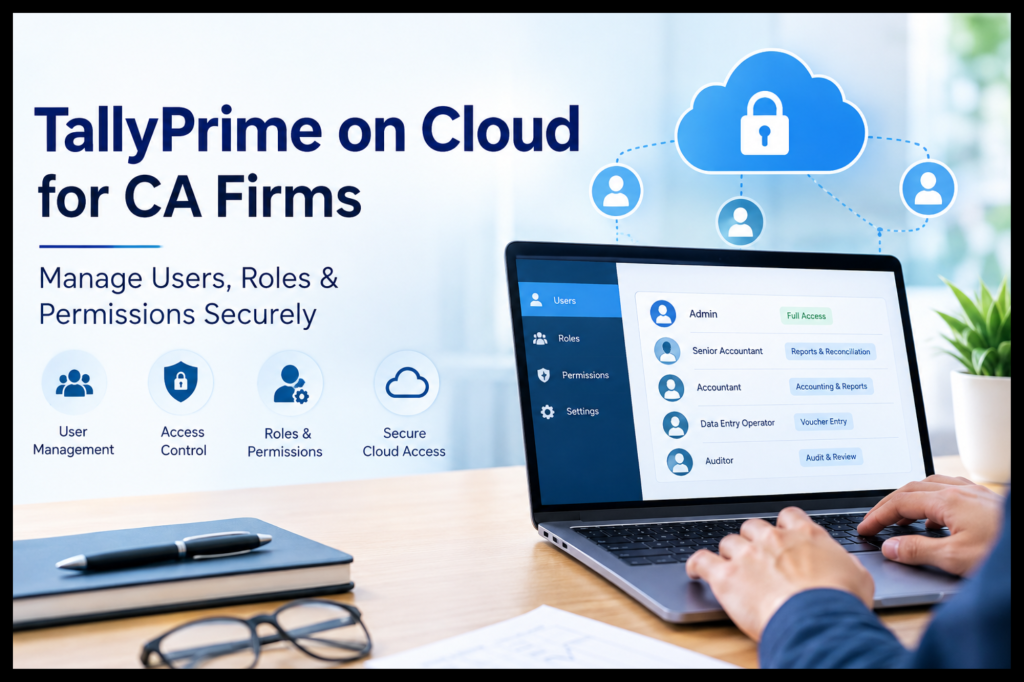
Instead of giving permissions individually to every employee, CA firms should create practical role categories.
For example:
User Role Typical Access
Data Entry Executive: Voucher creation and basic masters
Accountant: Accounting entries and relevant reports
Senior Accountant: Accounting, reconciliation, and broader reports
Audit Team: Review and Reporting Access
Manager: Reports, monitoring, and selected approvals
Partner/Admin: Higher-level access and administration
These roles should be customized according to the firm’s internal processes.
TallyPrime allows administrators to create security levels and assign facilities based on business requirements.
Permission Management for Cloud TallyPrime Users
A chartered accountancy firm can adopt a hierarchical structure instead of giving unlimited permissions to its staff members.
Level 1: Data Entry Users
Staff working on data entry require permissions to enter transactions periodically.
Permissions required are for:
- Sales vouchers
- Purchase vouchers
- Receipt vouchers
- Preparation of basic ledger accounts
- Masters of customers and suppliers
No permissions are required for:
- Deletion of any important transaction
- Modify sensitive masters
- Access payroll
- Export all financial reports
- Change security settings
- Perform backups or restores
The exact permissions should depend on the firm’s workflow.
Level 2: Accountants
As opposed to data entry clerks, accountants usually need more extensive access.
According to their roles, they might require access to:
- Ledger accounts
- Bank reconciliations
- GST reports
- Accounts receivable/payable
- Trial Balance
- Profit and Loss
- Balance Sheet
- Altering vouchers
However, sensitive administrative tasks may still be kept under restriction.
Level 3: Auditors’ Groups
Many audit practitioners will require viewing and analyzing information without necessarily making changes to accounting records.
A CA firm can therefore design an audit-oriented role with access to:
- Ledgers
- Vouchers
- Financial statements
- Trial balance
- Exception-related reports
- Relevant transaction history
Where possible, editing and administrative permissions should be separated from review responsibilities.
It shows how the idea of segregation of duties is applicable. This is where no one person manages the whole process of the financial transactions.
Level 4: Managers and Partners
Managers and partners may need broader visibility across client accounts.
Their access may include:
- Financial reports
- Management reports
- Review functions
- Client-level information
- Selected administrative activities
However, even senior users do not necessarily need every technical permission.
Administrator access should be limited to trusted personnel.
Use Role-Based Access Instead of Giving Everyone Full Access
One of the biggest mistakes in accounting environments is giving every employee administrator-level access simply because it is convenient.
A more effective system is called Role-Based Access Control (RBAC).
The logic is quite straightforward:
User → Roles → Permissions
For example:
Junior Accountant → Data Entry → Create vouchers
As opposed to:
Junior Accountant → All Rights → Do anything
TallyPrime supports security levels that allow administrators to control which facilities users can access.
This becomes especially important when using Tally on Cloud for CA firms, because remote accessibility should not automatically mean unrestricted access.
Restrict Sensitive Accounting Activities
Some accounting functions deserve additional attention.
Voucher Alteration and Deletion
A user who can create transactions may not necessarily need the ability to alter or delete previously entered transactions.
TallyPrime’s security controls can be configured to allow voucher creation while restricting alteration, depending on the firm’s requirements.
This can be useful for firms that want an additional review layer.
Example
A junior accountant prepares a payment voucher.
The senior accountant reviews it.
The junior accountant has no access to change the voucher once it is posted.
This creates a simple segregation of duties.
Restricting Access to Financial Statements
All employees do not necessarily need access to all financial statements.
For example, an accounting clerk does not need access to:
- Profit & Loss
- Balance Sheet
- Cash Flow
- Financial dashboards
- High-value transaction reports
TallyPrime allows administrators to control access to reports and even specific dashboard components through user roles.
This allows CA firms to align system access with employee responsibilities.
Control Remote Access Carefully
One of the key benefits of TallyPrime on Cloud is remote accessibility.
But remote access should always be controlled.
TallyPrime allows administrators to specify whether users can access a company remotely and assign security levels to those users.
CA firms should therefore maintain a list of:
- Active users
- Inactive users
- Remote-access users
- Administrators
- Audit users
- Temporary users
When an employee leaves the organization or no longer works on a client account, their access should be reviewed promptly.
Review Users and Permissions Regularly
User management should not be treated as a one-time setup task.
CA firms should conduct periodic access reviews.
A simple quarterly review can include:
- List all active users.
- Identify users who have changed roles.
- Check users with administrator-level access.
- Remove unnecessary accounts.
- Disable inactive users.
- Review remote-access permissions.
- Review sensitive report access.
- Check whether permissions still match job responsibilities.
TallyPrime’s Control Centre provides user-management capabilities for creating, editing, deleting, and changing user status, as well as managing security levels.
Adopt Effective Password and Security Policies
Technology alone does not ensure secure accounting processes.
CA organizations should also adopt internal policies that cover the following:
- Strong passwords
- Qualifications unique to the job
- Routine change of passwords
- Not sharing passwords
- Deactivating accounts for former employees
- Less use by administrators
- Using secure devices
- Maintaining the OS and browsers up-to-date; managed remote access.
TallyPrime also provides password-policy management and security controls as part of its security features.
Protect Backup and Administrative Operations
Backup and restore operations can have significant consequences.
Therefore, not every employee should be able to:
- Create or restore backups
- Rewrite company data
- Split companies
- Create companies
- Manage server-level operations
TallyPrime Server security configuration allows administrators to control permissions for activities such as backup, restore, rewrite, company creation, and other server-management functions.
For a CA firm managing multiple client datasets, these permissions should be assigned carefully.
Use Audit Trails for Accountability
Access control answers the question:
“Who is allowed to do something?”
Audit tracking helps answer:
“What happened after they did it?”
TallyPrime includes edit-log functionality that can track changes made to transactions and other accounting information, including details such as the user and time associated with changes.
The above may be especially helpful for CA firms while analyzing:
Modified vouchers
Revised ledgers
Revised masters
Unusual accounting activities
Revised after review
This adds another level of responsibility to the accounting process.
Example: A CA Firm Utilizing Tally on Cloud
Think of a CA firm that has the following employees:
- 2 Partners
- 3 Senior Accountants
- 8 Junior Accountants
- 2 Auditors
- 1 Administrator
The firm will not have to give access rights to all 16 employees.
Proposed Structure
Partners
- Unrestricted access to all reports
- Access Review
- Selective Access
Senior Accountants
- Accounting
- Reconciliation
- Financial Reports
- Access by Client
Junior Accountants
Posting vouchers
Limited master file creation
Prevention of alterations
Audit Team
Permissions to view and generate reports
Administrator
User Management
Security Settings
Management of Cloud Infrastructure
The actual design will be determined by the process and risk environment of the organization.
This model allows the firm to take advantage of Tally on Cloud without treating cloud accessibility as unrestricted access.
Tally on Cloud for CA Firms: Key Security Benefits
When implemented with proper access policies, a cloud-based TallyPrime environment can support:
Centralized access
Groups can operate from various places while having access to the same hosted accounting environment.
Controlled user permissions
Users can receive access based on their responsibilities rather than receiving identical privileges.
Greater accountability
Individual user accounts help make it simpler to link user actions with the user.
User management
In a cloud environment, it may be possible to simplify the process of adding and disabling users, among other things.
Support for remote teams
Accountants, auditors, and partners can work remotely without depending entirely on a physical office workstation.
What Should CA Firms Check Before Choosing TallyPrime on Cloud?
Not every cloud-hosting setup is identical.
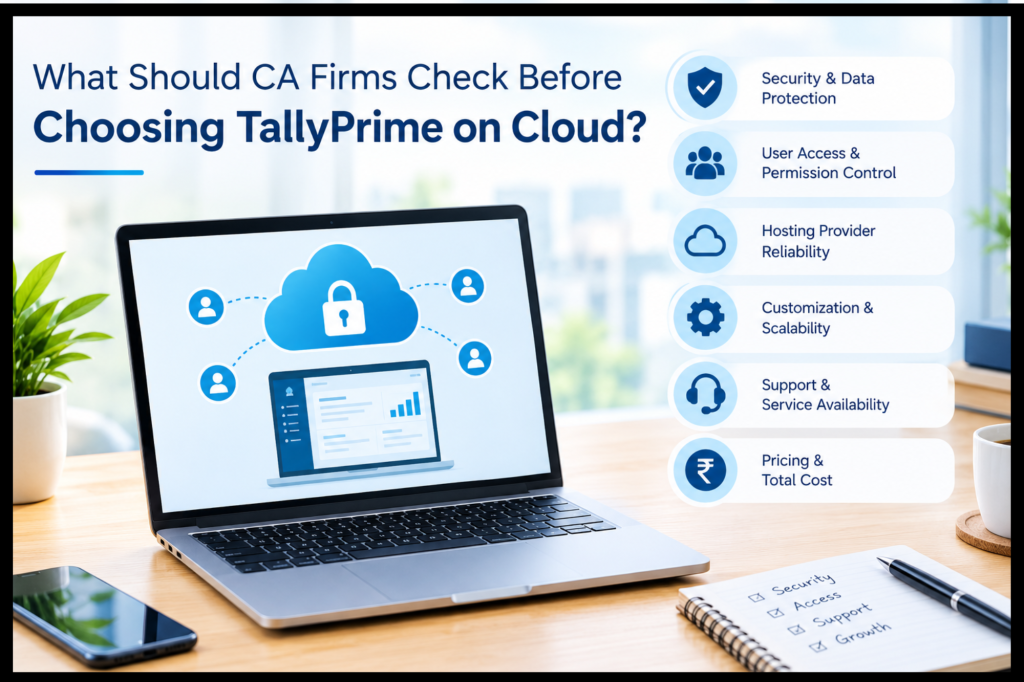
Before moving accounting operations to the cloud, CA firms should evaluate:
- User-access controls
- Data security practices
- Backup procedures
- Disaster-recovery process
- User authentication
- Server infrastructure
- Support availability
- Data isolation
- Remote-access controls
- Performance
- Scalability
- Exit and data-retrieval procedures
Most importantly, firms should understand which security responsibilities belong to TallyPrime and which belong to the cloud-hosting provider.
However, TallyPrime offers application-level security measures, but at the same time, the security of the hosted environment relies on the infrastructure, configuration, and procedures around it.
TallyPrime Security: Best Practices Checklist for CA Firms
Before you go live, here is a quick checklist to follow:
✅ Assign each employee an individual user account.
✅ Develop roles based on job duties.
✅ Ensure least-privilege access.
✅ Limit administrator access.
✅ Check your access control for remote access.
✅ Limit access to confidential reports if necessary.
✅ Maintain separation between data entry and authorization.
✅ Control access to vouchers to modify or delete.
✅ Validate former and inactive staff.
✅ Back up and restore capabilities.
✅ Password management.
✅ Monitor associated changes to the editing and accounting systems.
✅ Conduct periodic access evaluations.
✅ Document your organization’s user permission policy.
Conclusion:
TallyPrime access management for today’s CA firms is not merely about giving people access to log in. It is about creating an environment where the right person gets the right access at the right time.
With Tally on Cloud, companies can enable their accounting to be done remotely, using the features of TallyPrime to manage access and security and develop an access model for their accounting activities.
For any CA firms planning to upgrade their accounting processes, the Tally on Cloud product from Tally Stack may be considered in addition to a wider plan that would help enable an easily accessible and professionally managed TallyPrime. The important thing is to balance cloud access with good user permission control.
FAQs
1. What do you understand by Tally on Cloud in the case of CA firms?
Tally On Cloud means TallyPrime running in a cloud environment rather than depending entirely on the local PC or office network system. For CA firms, Tally on Cloud can be used for remote accounting purposes, multi-location teams, and centralized access with the help of user permission control in TallyPrime.
2. Can CA firms create different user roles in TallyPrime?
Yes. TallyPrime supports multiple security levels and user roles. Administrators can define permissions based on the user’s responsibilities and control access to different facilities and reports.
3. Are accountants able to use TallyPrime remotely?
Yes. TallyPrime allows remote access by authorized personnel. The Tally.NET user can be created by the administrator, remote access enabled, and the right security level assigned.
4. Should every employee have administrator access?
No. Giving administrator-level access to every employee is generally unnecessary and can increase operational risk. CA firms should follow least-privilege access and give employees only the permissions needed for their responsibilities.
5. How can CA firms restrict voucher alteration?
TallyPrime security controls allow administrators to configure permissions for vouchers. For example, a role can be configured to allow voucher creation while restricting alteration, depending on the firm’s requirements.
6. How often should CA firms review TallyPrime user permissions?
A practical approach is to review permissions at least quarterly and whenever an employee joins, leaves, changes responsibilities, or stops working on a particular client. High-risk permissions should be reviewed more frequently.
7. Is TallyPrime on Cloud automatically secure?
No technology should be treated as automatically secure simply because it is cloud-based. Security depends on application settings, user permissions, authentication, hosting infrastructure, backups, monitoring, and internal policies. CA firms should evaluate the complete security model before migrating.
8. What is the most common mistake that CA firms should not make?
The most common mistake would be to give users more access than necessary. The structured approach of roles and individual accounts would provide a better platform for secure accounting activities.